Your Starter Kit for the Web Agents Hackathon
A practical guide for building at the Browser Use hackathon at YC, with the hackathon sponsor tools already wired together.
The Web Agents Hackathon kicks off tomorrow at YC (Feb 28 to March 1), hosted by Browser Use. If you’re looking for a way to build with the sponsor tools without wiring everything together yourself, here’s how we can help.
VibeFlow is a builder for agentic web apps. You describe what you want in plain English, and VibeFlow generates an AI-powered workflow with tools connected, a database configured, and a production-ready frontend. Most of the hackathon sponsor tools are already built in, and every participant gets $200 in free VibeFlow credits.
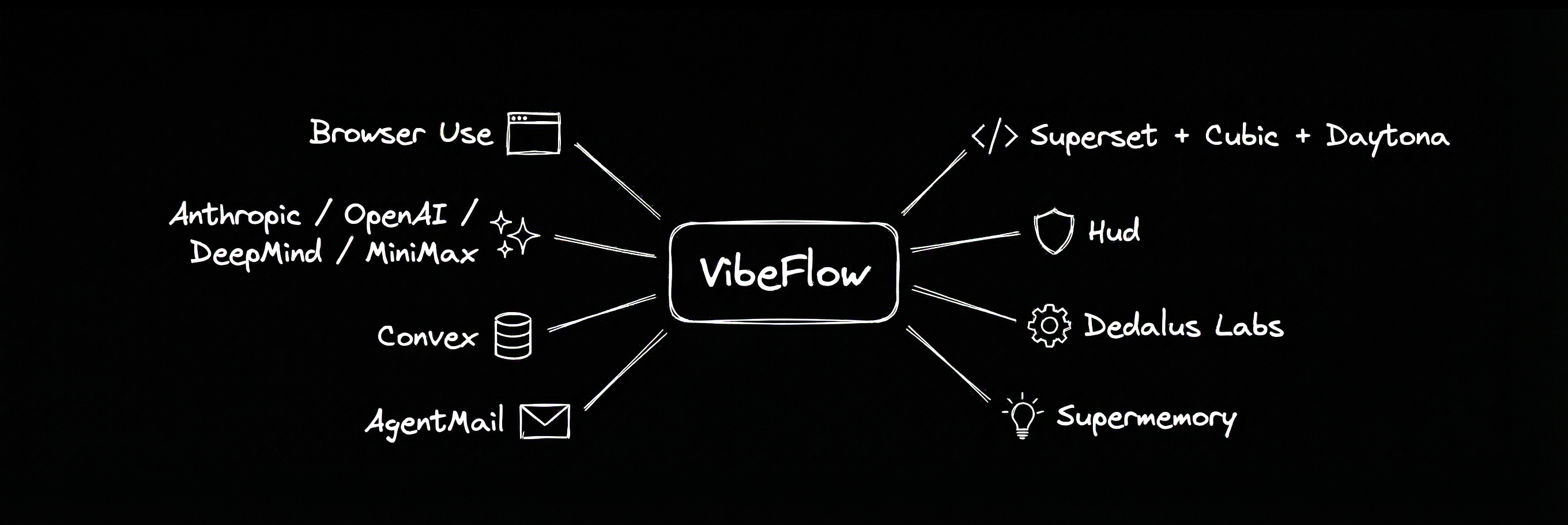
Here’s what each tool does inside VibeFlow, and how to actually use them together.
Start building now at app.vibeflow.ai →
The sponsor tools, inside VibeFlow
 Browser Use is your agent’s eyes and hands on the web. VibeFlow has a dedicated Browser Use Task Node. You describe what you want the browser to do, define a JSON schema for the output, and it runs. Browse the community templates for ready-made examples, or follow our GitHub Trending daily email tutorial to see how it works step by step.
A Browser Use node in VibeFlow.



 Anthropic, OpenAI, DeepMind, MiniMax power the brains. VibeFlow’s Agent Nodes are LLM steps in your flow that process text, make decisions, or return structured data. Choose your model from the provider you prefer.
 Convex is your database. Every VibeFlow app gets a Convex backend out of the box. Define collections, write queries, and your UI updates live when data changes.
 AgentMail is email as a first-class agent capability. VibeFlow has a built-in AgentMail integration with 10 ready-made actions: create inboxes, send and reply to messages, list threads, and more. Add them to your flow from the Integrations menu, or wire them as tools to an Agent Node so your agent can send and read emails mid-reasoning.
 Supermemory is memory that persists across runs. VibeFlow has a built-in Supermemory integration with actions for adding, searching, listing, and deleting documents. Add them to your flow or wire them as tools to an Agent Node, just like AgentMail. Your agent stores and retrieves context between conversations, so it doesn’t start from scratch every time.
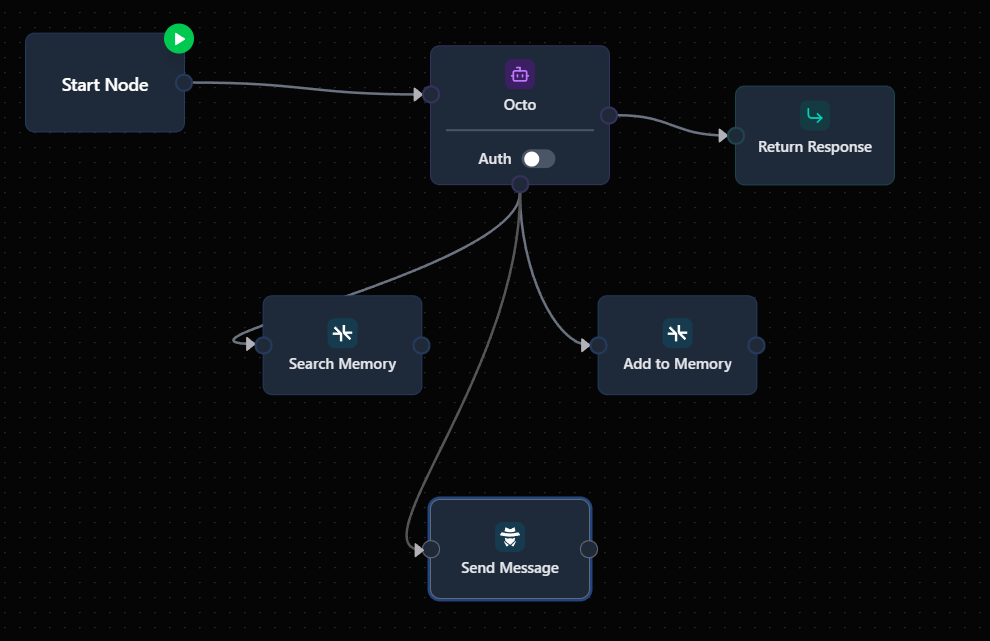
A VibeFlow flow is a graph of nodes. “Start Node” receives the input. “Octo” is an Agent Node, an LLM step that reasons, calls tools, and returns structured data. “Search Memory” and “Add to Memory” are Supermemory integration nodes, and “Send Message” is an AgentMail integration node. “Return Response” sends the final output back.
 Dedalus Labs lets you deploy agent workers that build things. Agents can call the VibeFlow MCP server to create and manage entire VibeFlow apps autonomously: scaffolding full-stack projects, adding components, monitoring builds, all from a text prompt.
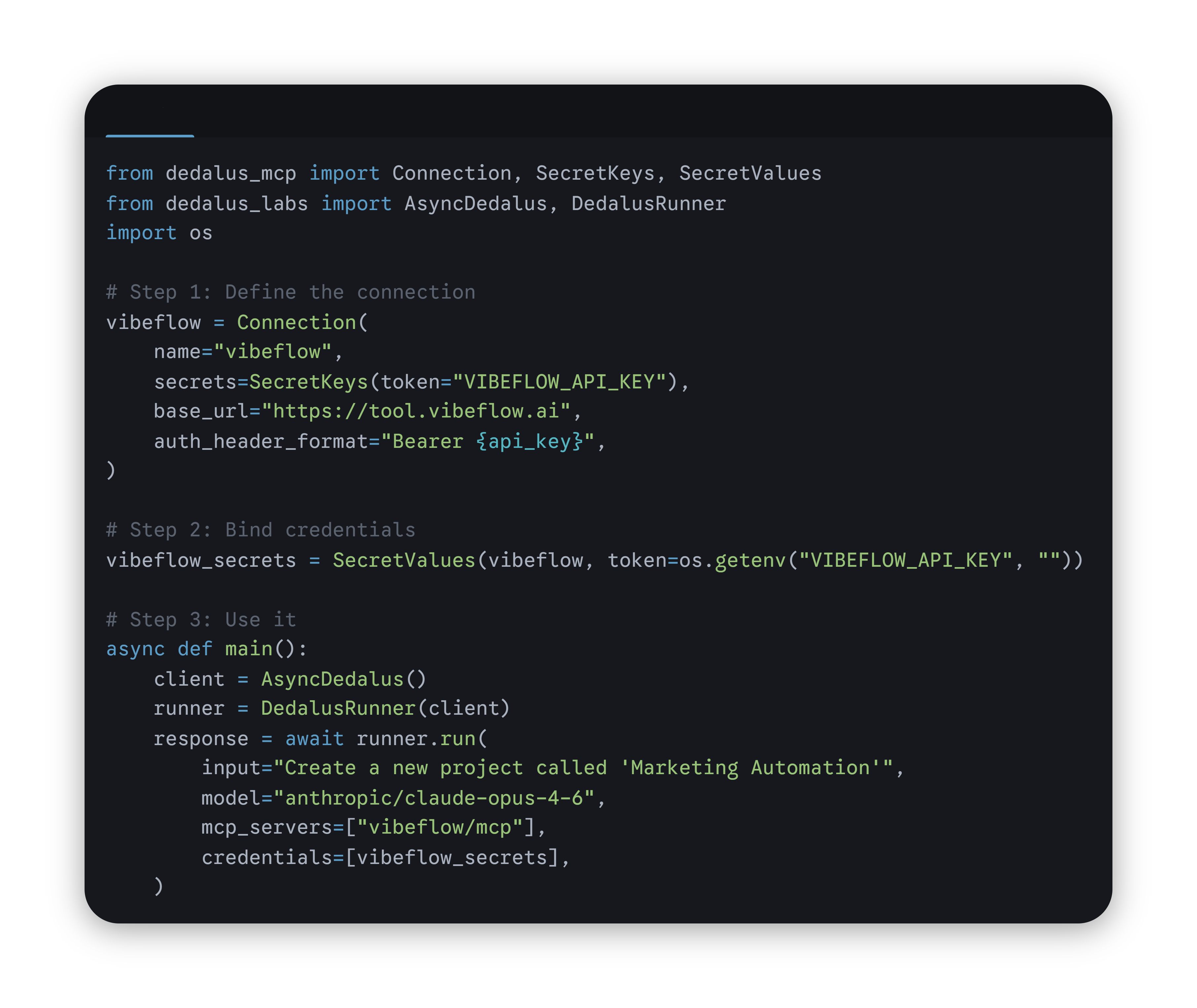
 Superset runs parallel coding agents. Run Claude Code, Cursor, and others simultaneously via the VibeFlow MCP. Have three agents build three different parts of your app at the same time.
 Cubic does automated code review on every push. Every VibeFlow app syncs to a GitHub repo with full git history. Point Cubic at it and get code quality checks on every commit.
 Daytona powers the sandboxes behind VibeFlow. Every time you run a flow, it executes inside a Daytona cloud environment.
 Hud lets you prove your agent works. Deploy your agent in VibeFlow, check how it performs in Hud.
Build this: a daily research agent
Here’s a concrete example that chains five sponsor tools into one flow. You could build this in under 30 minutes on VibeFlow.
The use case: Every morning at 8am, an agent searches the web for the latest news on “AI agent frameworks,” summarizes what’s new, skips anything it’s already reported on, saves everything to a live dashboard, and proves it works reliably.
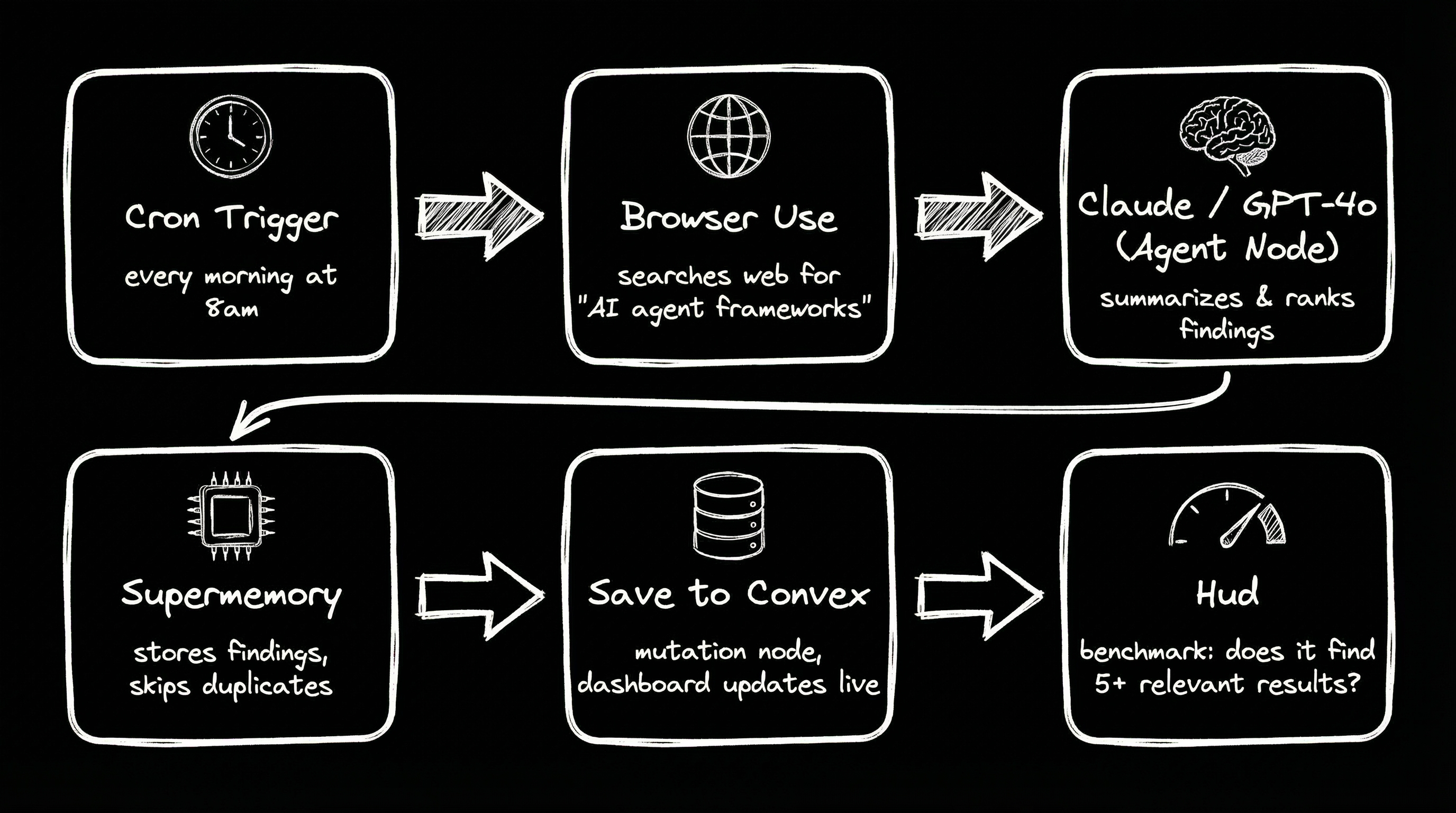
- Cron Trigger fires every morning at 8am.
- Browser Use Task Node searches the web for “AI agent frameworks” and extracts titles, URLs, and summaries as structured JSON.
- Agent Node (Claude, GPT-4o, or Gemini) ranks the results by relevance, removes noise, and writes a clean briefing.
- Supermemory checks what’s already been reported and filters duplicates. Stores today’s findings for next time.
- Mutation Node saves the briefing to Convex. A dashboard auto-updates with the latest report.
- Hud runs a benchmark: does the agent consistently find 5+ relevant, non-duplicate results?
That’s Browser Use + an LLM + Supermemory + Convex + Hud. Five sponsor tools, one project, fully deployed.
Build this right now on VibeFlow →
Steal these project ideas
Each one is buildable this weekend with the tools listed above.
HN Hiring Matchmaker
Browser Use opens the latest Hacker News “Who’s Hiring” thread and extracts company names, roles, and tech stacks. An Agent Node filters them against your preferences stored in Supermemory (e.g. “remote, Rust or Go, Series A or earlier”). AgentMail sends you the matches with a one-line note on why each fits. Convex stores every listing so the dashboard shows what’s new since last run. Run it on a cron, or hit a button to check now.
ProductHunt Launch Tracker
Browser Use visits ProductHunt’s front page and pulls the day’s launches: name, tagline, description, and upvote count. An Agent Node scores each one against criteria you define (“developer tools with an API, launched in the last 24 hours”). Supermemory tracks which launches you’ve already seen so you never get duplicates. Convex stores the pipeline. AgentMail sends a nightly summary with the top 5 and why they scored high.
Craigslist / Marketplace Deal Finder
Browser Use searches Craigslist (or any public listings site) for a specific query like “Herman Miller Aeron” or “studio apartment under $2000.” An Agent Node evaluates each listing: is the price below market? Does it look legit? Supermemory remembers listings you’ve already been sent. AgentMail alerts you within minutes when something good shows up. Convex stores the full history so you can see trends on a dashboard.
Company Research Assistant
You paste a company name into the app. Browser Use finds their homepage, LinkedIn page, and recent blog posts. An Agent Node pulls out key facts: what they do, team size, funding stage, tech stack, and recent news. Supermemory stores the research so if you look up the same company later, it builds on what it already knows instead of starting over. The result saves to Convex and shows up in a clean dashboard. Use Hud to verify the agent consistently extracts accurate company info across 20+ test cases.
GitHub Repo Scout
Browser Use visits GitHub’s trending page (or a specific topic like “browser automation”) and pulls repo names, descriptions, star counts, and recent commit activity. An Agent Node identifies repos that are actively maintained, growing fast, and underrated (high commit frequency, low star count). Supermemory tracks repos you’ve already reviewed. Convex stores everything in a searchable dashboard. AgentMail sends a weekly digest of the most interesting finds.
Pick an idea and start building →
Quick reference
| Tool | How it fits |
|---|---|
 VibeFlow VibeFlow | Build agentic web apps: workflows, frontends, database. |
| Browser Use | Browser automation via the Task Node. |
| Anthropic / OpenAI / DeepMind / MiniMax | LLM in Agent Nodes. Switch models in one click. |
| Convex | Real-time database. Collections, queries, live UI. |
| Hud | Agent evaluation and benchmarks. |
| AgentMail | Email for agents (built-in Agent Tool). |
| Supermemory | Semantic memory (built-in Agent Tool). |
| Dedalus Labs | Deploy agent workers via MCP. |
| Superset | Run coding agents in parallel. |
| Cubic | Code review on generated code (via Git Sync). |
| Daytona | Cloud dev environments. |
Want to know more about VibeFlow?
- Website: vibeflow.ai
- Docs: docs.vibeflow.ai
Get started in 5 minutes
- Create an account at app.vibeflow.ai and describe what you want to build. The AI generates your first flow.
- Add your API keys in Settings → Connectors (Browser Use, AgentMail, Supermemory, etc.).
- Try the MCP server if you want to build from Cursor or the terminal. Docs here.
Twenty hours. $180K in prizes. See you there. vibeflow.ai →